Getting started
This page walks through installing sonata, running sonata init, and dispatching your first subagent. For what sonata is and why you might want it, see the README.
Requirements
- Node 22+
- tmux — every harness runs inside a tmux session (
brew install tmux,apt install tmux) - macOS or Linux. Windows is not supported; WSL should work but is untested.
- A provider — an API key for one of ~30 well-known providers (no harness needed), your Claude Code account, or at least one authenticated harness: OpenCode, Codex CLI (
codex login), Pi or Reasonix (reasonix setup). - LiteLLM — managed, and only when a gateway needs it. Sonata installs its own pinned copy (
sonata litellm install, offered bysonata init); a gateway that speaks the Anthropic Messages API natively needs no Python at all. When LiteLLM is needed,uvor apython3in>=3.10,<3.15is required.
Install
npm install -g @zhihaohong52/sonataLater, sonata upgrade installs the newest release; run sonata restart afterwards so the router runs it too.
Set up a project
In the repository where you want to use it:
sonata initsonata init detects your environment, reports anything broken with the command that fixes it, and asks which providers, models and roles you want.
Provider setup is a menu, modeled on opencode's own /connect: bulk-import everything you're already logged into elsewhere, or add providers one at a time — including one sonata has never heard of.
  ███████╗ ██████╗ ███╗   ██╗ █████╗ ████████╗ █████╗
  ██╔════╝██╔═══██╗████╗  ██║██╔══██╗╚══██╔══╝██╔══██╗
  ███████╗██║   ██║██╔██╗ ██║███████║   ██║   ███████║
  ╚════██║██║   ██║██║╚██╗██║██╔══██║   ██║   ██╔══██║
  ███████║╚██████╔╝██║ ╚████║██║  ██║   ██║   ██║  ██║
  ╚══════╝ ╚═════╝ ╚═╝  ╚═══╝╚═╝  ╚═╝   ╚═╝   ╚═╝  ╚═╝

  foreign-model subagents for Claude Code

  ✓ tmux 3.7b
  ✓ opencode 1.18.19 · 520 models
  ✓ codex codex-cli 0.149.0 · 6 models

  Set up providers
  ❯ Import from other harnesses
    Add provider

  ↑↓ choose · enter confirm · ← back · esc cancel
Import from other harnesses bulk-selects providers your installed harnesses are already authenticated for — nothing to type, nothing to re-enter. It lists every provider with a detected credential (an OAuth grant or a plain API key sitting in another harness's own store), whether or not it is already configured, and pre-checks the ones that are — so the same screen doubles as a toggle: unchecking an already-imported provider removes it, along with its models and any role assignments that used them:
  Import from other harnesses

  filter: █

  ❯ ◉ codex     · expires in 8d
    ○ openai    · expires in 8d

  2 of 2 · space toggle · type to filter · enter confirm · esc cancel
Add provider searches the merged catalogue of every provider a harness knows about plus ~30 well-known BYOK providers — or lets you type in one sonata has never seen:
  Add provider

  filter: █

  ❯ acme                · opencode
    anthropic           · opencode
    codex               · codex
    deepseek            · byok
    ⋮
    Add a custom provider…

  38 of 38 · ↑↓ choose · type to filter · enter confirm · ← back · esc cancel
Picking a known provider offers Run OAuth login (for codex and github-copilot, the two providers sonata can authenticate on its own — see the Native path guide) or Enter an API key. Picking a harness-catalogued provider then shows its models to select from:
  Models to enable

  filter: gpt█

  ❯ ◉ openai/gpt-5.6-sol      · GPT-5.6 Sol
    ○ openai/gpt-5.6-luna     · GPT-5.6 Luna

  2 of 13 · space toggle · type to filter · enter confirm · esc cancel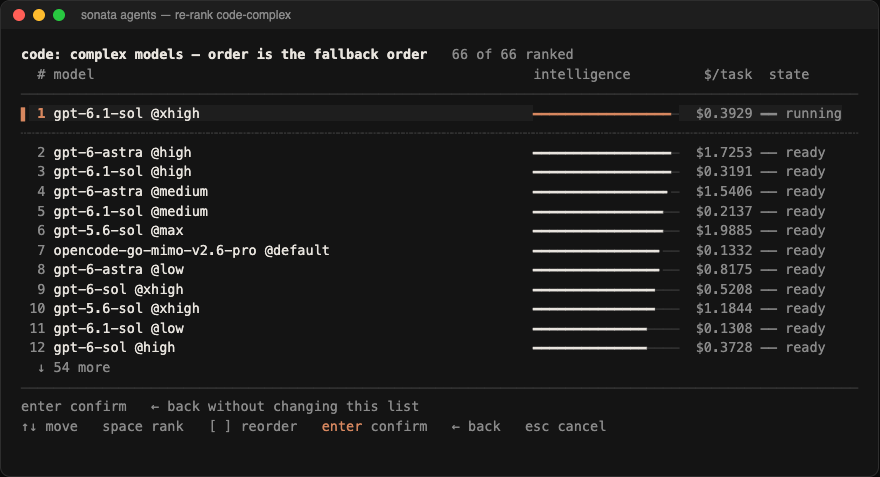
Then it asks you to rank your selected models into simple, normal and complex tiers per role — pre-sorted by a cached Artificial Analysis catalog (sonata catalog update, with a free key from artificialanalysis.ai) when one exists, or built-in defaults otherwise. The key is optional; without it the wizard still works, just with coarser defaults. complex is ordered by capability, and a model within 3 points of the strongest counts as tied with it, so the cheaper one leads. normal leads with the knee of the price-performance frontier, then follows capability per task-dollar. simple is that same value order filtered to models costing at most 12 times the best-value model per task — so it leads with the best-value model, not the knee. Demanding work goes to the strongest model you picked, ordinary work to the best value, and grunt work stays within the cheaper fallback chain. Set avoid_gateways in sonata.toml to rank a particular gateway's models last without dropping them as fallbacks. It then asks whether the config applies to this project or the whole machine, writes sonata.toml, generates one agent per role × tier (identical tiers collapse into one agent named for the role), offers to install the permission hook, installs the sonata-loop skill, and offers to run sonata route auto so the generated agents have a router to reach. Project scope writes ./sonata.toml and ./.claude/agents/; machine scope writes ~/.config/sonata/sonata.toml and ~/.claude/agents/, where Claude Code offers the agents in every repository.
Claude Code picks up the new agents automatically; no restart is needed. To change a ranking later, run sonata agents and press enter on a tier; r there resets it to the order the catalog suggests now.
Every prompt has a flag, so it also works unattended:
sonata init --yes --providers opencode/openai --models opencode-openai-gpt-5.6-sol --roles code,review --scope projectBYOK (bring your own key)
Sonata does not need a harness. Add provider lists ~30 well-known providers alongside anything your harnesses discovered; pick one, enter its API key, and choose from the models it reports. A provider not on that list — an internal proxy, a self-hosted endpoint — doesn't need to be: Add a custom provider…, at the bottom of that same search list, asks for a name, a base URL, and whether it speaks OpenAI's or Anthropic's wire format, then drops into the same key-entry flow.
The key is stored in sonata's own key store — never in sonata.toml, never in an agent file, and never on the command line. It is written only after you confirm the summary, so cancelling the wizard stores nothing.
Unattended, with the key stored first so it stays out of argv and shell history:
sonata auth add deepseek
sonata init --yes --providers byok/deepseek --models deepseek-deepseek-v4-flash --roles code
BYOK models use the native path, so they run inside Claude Code's own loop, tools and permission modes.
Two things worth knowing before you pick a provider:
- Model discovery is a convention, not a guarantee. Sonata asks the provider for
GET <base_url>/models, which every provider in its list implements. If yours does not answer — offline, or a different shape — the wizard asks you to type the model ids instead, saying which of those happened. That is a fallback, not an error. - A rejected key gets its own screen. If the provider answers 401 or 403, sonata says so and offers to take a different key. It also offers to keep the one you gave and type ids by hand, because some providers refuse to list models for a key that works perfectly well for inference.
- Claude models are ordinary models. A tier may rank a
claude-*id that a gateway serves (Copilot, OpenRouter, any other), or one on your own Claude Code account through aclaudegateway withauth = "session"— sonata init offers both. Only aclaude-*name your config does not define passes straight through to Anthropic. See the Native path guide.
Adding Codex models
The wizard discovers OpenCode, Pi and Reasonix models by provider then by model, and Codex through codex app-server's model/list (JSON-RPC over stdio — codex has no provider dimension and takes a bare model id). A bare-id model can also be added by hand:
[models."gpt-5-6-sol"]
harness = "codex"
id = "gpt-5.6-sol"
Hand-written entries survive sonata init — the wizard carries through any model whose harness it does not manage.
Then run sonata sync to regenerate the agent files; Claude Code picks them up automatically.
Using it
The generated agents are ordinary registry entries, so Claude selects them the same way it selects any other subagent. Ask for one by name, or describe work that suits it:
"Use code-simple to convert these callbacks to async/await."
"Use code-normal to add this flag and its tests."
"Get review-complex to look at the auth refactor."
Choose a tier by the task, not its size: simple is specified closely enough that the diff can be written without asking a question; normal is the default when you know what to change but need to fit it into the surrounding code; complex needs a design decision or the meaning of done is ambiguous. Size is not difficulty: a large mechanical change is simple, while a three-line interface decision is complex. When unsure, use -normal; a task that fails review twice is re-run one tier up. The sonata-loop skill sonata init installs (skills/loop/SKILL.md) drives this across a whole feature: plan, route each task to a tier, gate behind review, and escalate simple to normal to complex after repeated failures. The same folder is a Claude Code mod with a live panel: the loop's tasks, each tier agent's current activity, the model the router served, and an agent's diff when you select its row. /sonata-loop panel toggles it once the mod is loaded — start a new session after sonata sync, and sonata doctor checks it. See the Native path guide for the plugin-marketplace install.
With [auto_route] configured (see Configuration), init also generates a <role>-auto agent per role, which asks a small decision model to pick the tier for each task. It is off unless you write that table.
They compose with everything Claude Code already does — parallel fan-out, workflows, and isolation: "worktree".